


Patient & clinic journey
Why Invent Medical? The Complete Patient & Clinic Journey
Resources from Invent Medical
Invent Medical is designed around how a real medical facility works — not around isolated software modules. Built on more than 16 years of experience working closely with clinics and medical facilities, Invent Medical connects the patient journey from the first online interaction through booking, arrival, consultation, payment and follow-up, while also supporting the operational and financial work that continues behind the scenes.
The platform is used by thousands of users across healthcare and business environments, including clinic and hospital deployments. That experience has shaped a practical development approach: observe real operational problems, work closely with users, and build technology around the way medical facilities actually operate.
The easiest way to understand the platform is through a practical scenario. Imagine Clinic A: a growing medical facility that wants to attract patients online, reduce missed opportunities, improve reception efficiency, give clinicians better tools, simplify payment and keep the wider business operation connected.
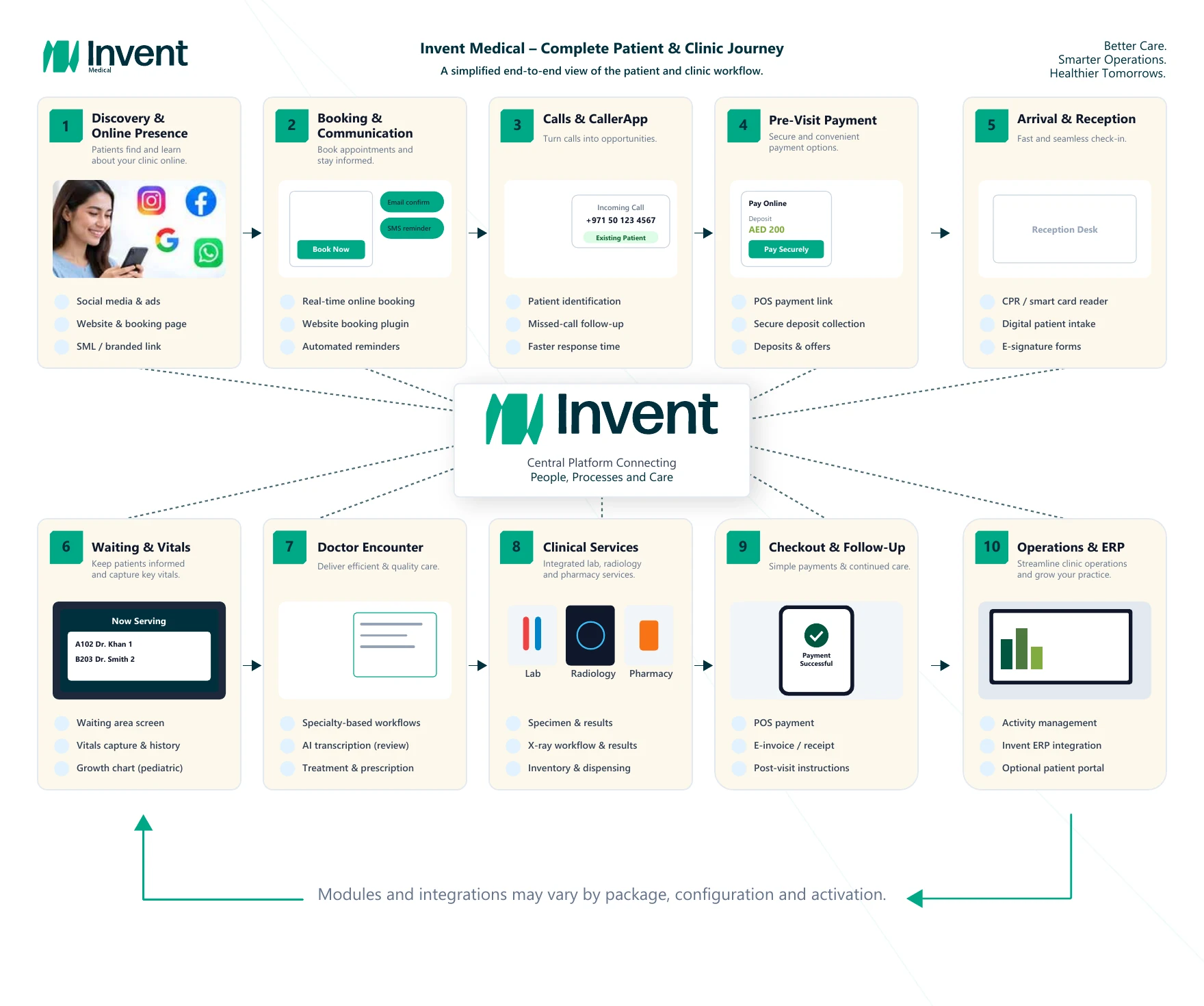
1. Get Found & Booked
Clinic A wants to generate more bookings without forcing patients through a complicated process or requiring a separate booking system.
Invent Medical can provide a branded Social Media Link (SML) that the clinic can place on Instagram, WhatsApp, advertising campaigns, Google Business and other digital channels. The SML can be customized with the clinic's primary and secondary brand colors, logo, providers, provider photos, clinic photos, videos and booking options. It gives the clinic a ready-to-use digital presence even if it does not yet have a full website.
If the clinic already has a website, a supported booking plug-in can be embedded into it and connected to the Invent Medical scheduling environment. If the clinic wants a complete website, Invent can also provide website design and integration as a separate service.
The objective is simple: move the patient from interest to booking with as little friction as possible, while keeping the booking connected to the live clinic schedule and reducing clashes or duplicate appointment handling.
2. Calls, Confirmations & Pre-Visit Payment
Not every patient books online. Many still call — and growing clinics often discover that call handling becomes one of their biggest operational bottlenecks.
With the optional CallerApp integration, supported clinic telephony can connect with Invent Medical. Reception staff can identify a known patient more quickly, distinguish between new and existing callers and see useful context before starting the conversation. This reduces the repeated process of asking who is calling, searching for the file and collecting the same information again.
Missed calls are particularly important. If patients call after hours, during weekends or while reception is busy, supported CallerApp workflows can surface the missed calls for structured follow-up. Instead of relying on staff to manually search telephone logs, the clinic can work through an organized callback list when it reopens.
Appointments can then be confirmed through supported channels such as email, SMS and configured WhatsApp messaging. Reminders and selected follow-up messages can also be sent through approved templates.
Where online payment is enabled, the clinic can send a secure payment link before the patient arrives. This is useful for deposits, offers, packages, guaranteed bookings or remote patients, including patients outside Bahrain where the activated payment service permits the transaction.
The accounting treatment can follow the real workflow. The amount may be applied against an invoice, or it may be held as an advance / unearned amount until the related service is delivered. This allows the payment process to reflect the actual clinical and accounting scenario instead of forcing one fixed treatment.
Invent Medical supports selected payment integrations through partners including AFS and Eazy where activated. Availability, transaction charges, settlement terms and regulatory conditions depend on the clinic's package and the relevant payment-provider agreement.
3. Arrival & Digital Reception
When the patient arrives, supported smart-card reading can populate authorized demographic information into Invent Medical. This helps reduce manual typing, spelling mistakes and duplicate patient files. In supported deployments, compatible chip-based identity cards can be used subject to the relevant reader and integration environment.
The clinic can also configure digital patient-rights forms, surveys, file-opening forms, treatment consents and other documents. Where electronic signature is enabled, the patient can complete and sign supported forms on a compatible tablet or mobile device, keeping the documentation linked to the patient record.
For larger facilities, a waiting-area display can show privacy-conscious patient identifiers, doctor or room information and status updates. When the patient is ready, the display can clearly indicate the next step without forcing patients to repeatedly approach the reception desk.
4. Waiting, Vitals & Consultation
Before the consultation, nurses can record vitals directly into the patient record. Previous readings can be compared over time, and supported pediatric workflows can include growth-chart tracking.
Inside the consultation, Invent Medical can be configured around the specialty and the doctor's preferred way of working. Cardiology, ophthalmology, dentistry and other specialties can use different workflows, templates, medical sheets, checkboxes, diagrams, structured fields and shortcuts. Dental workflows can include 2D/3D charting where the relevant module is enabled.
Where AI-assisted transcription is enabled, the doctor can dictate the consultation and receive a draft for review. The clinician remains in control: the draft is reviewed, corrected and approved before it becomes part of the medical record. The AI assists documentation; it does not autonomously finalize the clinical record.
Encounter sign-off and locking controls can also be used according to the clinic's configured governance workflow.
5. Treatment, Prescription & Clinical Services
The consultation can continue into treatment planning. Invent Medical can create a treatment roadmap that combines clinical priorities with financial information such as prices and permitted discounts. The plan can be printed, emailed or shared through supported digital channels.
Prescription workflows can be configured around the clinic's requirements and can support controlled draft/final states, clinic templates, clinician signature settings, diagnosis references and configured medication data sources.
If the patient needs further services, the workflow can continue into laboratory/specimen, radiology-related and pharmacy processes. Laboratory requests and results can be handled within the clinical workflow, radiology-related activities can be assigned and tracked, and activated pharmacy workflows can connect dispensing with inventory controls.
Clinics can also configure procedure-specific post-treatment instructions or education documents for digital delivery, helping standardize what the patient receives after selected procedures.
6. Checkout, Follow-Up & Mobile Access
At checkout, supported payment workflows can include online payment, QR-based payment and integrated card/POS transactions where enabled.
When a supported POS integration is active, transaction information can flow back into Invent Medical. This reduces the manual effort required to match patient transactions with payment-acquirer reports and helps improve reconciliation accuracy.
Electronic invoices and receipts can be shared digitally. The next appointment can also be booked immediately, with supported confirmation links and reschedule options sent through configured messaging channels so the patient may not need to call again for routine changes.
Invent Medical also supports mobile access through its mobile applications and responsive device workflows, allowing authorized users to access supported functions from compatible iOS and Android devices according to their permissions and the clinic's security configuration.
7. Operations, ERP & Patient Portal
The patient may leave, but the clinic's work continues.
Invent Medical includes activity-management capabilities for assigning and tracking clinical, insurance, administrative, finance, accreditation, hygiene and other operational tasks. Users can see what has been assigned, what is completed and what remains pending. Managers can maintain operational visibility even when away from the facility.
Invent Medical also integrates with the wider Invent ERP ecosystem. Depending on the subscribed package and deployment, this can extend beyond patient billing into accounting, purchasing, procurement, inventory, costing and VAT-related workflows. The value is that the medical and business sides of the facility can remain connected instead of operating in separate systems.
An optional patient portal can be enabled for eligible deployments after validation and security/authentication setup. Depending on the clinic's approved configuration, the portal can expose selected information such as medical history, prescriptions, notes and notifications. It is not enabled by default.
8. What Makes Invent Medical Different?
The strength of Invent Medical is not one individual feature. It is the way multiple parts of the clinic journey can work together in one connected environment.
A conventional EMR may focus primarily on the patient record and billing. Invent Medical is designed to connect the wider journey: digital acquisition, online booking, calls, reception, digital intake, specialty clinical workflows, treatment planning, payment, pharmacy, laboratory, follow-up, operational activities and ERP.
This reduces dependence on disconnected tools and gives the clinic a more unified view of the patient experience and the business operation. It also reflects the way the platform has been developed: through long-term exposure to real clinics, real users and real operational problems.
Comparison: what should a clinic evaluate when choosing an EMR?
| What to compare | Typical standalone EMR approach | Invent Medical approach |
|---|---|---|
| Online presence & booking | Often separate from the EMR. | SML, website plug-in and connected booking options can connect patient acquisition to the schedule. |
| Calls & missed calls | Usually handled outside the EMR. | CallerApp can connect supported telephony with caller context and structured missed-call follow-up. |
| Messaging | Often handled in separate tools. | Supported email, SMS and WhatsApp workflows can connect confirmations, reminders and follow-up. |
| Digital intake | Paper or separate form tools may be used. | Configurable forms, surveys, consents and supported e-signature can connect to the patient record. |
| Clinical workflow | Generic encounter screens and templates. | Specialty-configurable encounters, templates, medical sheets and optional AI-assisted transcription. |
| Treatment planning | Clinical and financial information may be separated. | Treatment plans can combine clinical roadmap, priority, pricing and permitted discounts. |
| Payments | May rely on separate tools and manual matching. | Supported online payment and POS integrations can connect payment activity back to the patient/accounting workflow. |
| Aftercare | Often handled manually. | Procedure-specific post-visit instructions and digital follow-up can be configured. |
| Operational tasks | Separate task-management software may be required. | Built-in activity management can cover clinical and operational work. |
| Back office | Often ends at patient billing. | Invent ERP integration can extend into accounting, procurement, inventory, costing and VAT-related workflows. |
| Mobile access | May be limited to desktop/web workflows. | Supported functions can be accessed through compatible iOS/Android applications and device workflows according to permissions. |
| Patient access | May require a separate portal product. | Optional validated patient portal can be enabled after security/authentication setup. |